“We’re in compliance.” He was already being sued over his website.
A business owner, speaking to WFLA in Tampa, May 19, 2025.
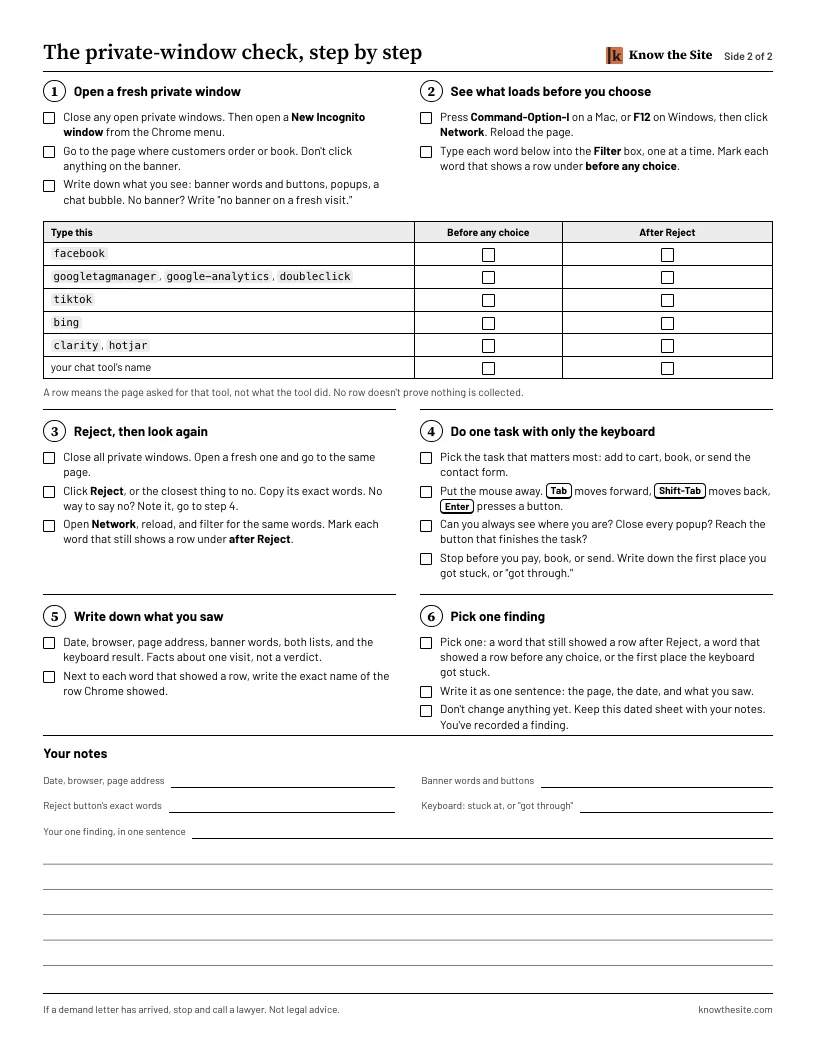
Free: the private-window check on one printed page.
Nobody likes being sold a fee by fear, and this page doesn’t sell one. It won’t tell you whether a letter will come, either. Nothing honest can.
A tool on a website is a claim about that website. One owner had a certificate of accessibility and a widget, and was being sued over his website when he told a TV station he was in compliance. Keep the tool. This one page shows you how to check one of its claims yourself.
Get the free checklist
Sent. Check your email.
Look for “Your private-window checklist for your state” from Know the Site (hello@mail.knowthesite.com). It should arrive within a few minutes. Not there? Check spam or Promotions.
You asked for the follow-ups: 5 short emails over the next 9 days. Each one has a one-click unsubscribe.
We couldn’t add this address to the follow-ups, so none will come. The email says how to ask for them.
Tonight, at your computer: open a fresh Incognito window, go to the page where customers order or book, and don’t click the banner. Copy what you see, and date it.
The checklist finds what’s happening. The guides cover what to do next: where the settings live on ten kinds of site, a worked example, and how to make one change you can undo. $67 once for the California website guide, with the AI guide included. No subscription. Sales tax added where it applies. Every cent back, including sales tax, if you email hello@knowthesite.com within 30 days of the files arriving. No reason needed. See what’s in the guides
- One printed page
- A short box for every state and DC
Not legal advice. It doesn’t decide which laws cover your business.
If a demand letter has arrived, stop and call a lawyer. This checklist isn’t for answering one.
This is what a website-access letter can look like
ASHGROVE BRIGHTWATER LLP
Attorneys at Law · San Diego, California · (619) 555-0182
September 15, 2026
VIA EMAIL AND U.S. MAIL
Tellwick Cycle Works, Inc.
Attn: Owner
Re: Demand before filing suit. Casey Pellham v. Tellwick Cycle Works, Inc. Americans with Disabilities Act and California civil rights law.
Dear Business Owner:
This firm represents Casey Pellham, who is blind and uses a screen reader to browse the internet.
On a recent visit, our client tried to buy a helmet on your website and was Note 1unable to complete a purchase. Note 2Product images had no text description. Note 3A pop-up offer could not be closed without a mouse, and Note 4the checkout button could not be reached by keyboard.
These barriers deny our client full and equal access to your goods and services, in violation of the Americans with Disabilities Act and California civil rights law.
We are prepared to file a lawsuit without further notice. To settle this before we file, please respond within 14 days of the date of this letter.
Sincerely,
Noelle T. Orsley
ASHGROVE BRIGHTWATER LLP
Where to look on your own site
“unable to complete a purchase” Do one real task, start to finish, on the page where customers order or book. Step 4.
“Product images had no text description” Image descriptions (alt text). The checklist doesn’t test these. Ask whoever built the site how they’re written.
“could not be closed without a mouse” Open the popup, press Escape, Tab to its close button. Step 4.
“could not be reached by keyboard” Tab, Shift-Tab, Enter. Can you reach the button that finishes the order? Step 4.
This checks part of the visit. It doesn’t test a screen reader, and it doesn’t show whether a site meets the law.
What “covered” meant to one owner
In May 2025, WFLA in Tampa interviewed a business owner who was being sued over his website. “We’re in compliance,” he said. The station reported that he had a certificate of accessibility from a website compatibility company and had added a widget for screen readers.
Source: WFLA, “Raining Berries CEO calls ADA lawsuit a ‘shakedown’,” May 19, 2025.
We can’t know what his site did, and this page doesn’t judge his tools. The point is narrower. A certificate, a widget or a banner app is a claim about a website.
Source: Federal Trade Commission, April 22, 2025.
Keep the tool. Check the claim. The rest of this page shows you how: a keyboard on the page where customers order or book, and a fresh private window for the banner.
What a score reports, and what it can’t
One card shows a score of 100 and a badge. The other asks: can a customer order?
A badge shows a tool is on the page. A score of 100 is what a scanner said about the code. Neither is a person trying to get from your menu to Book with only a keyboard.
The U.S. Justice Department says the same about automated checkers:
“A ‘clean’ report does not necessarily mean everything is accessible.”
Source: U.S. Department of Justice, Guidance on Web Accessibility and the ADA, March 18, 2022.
None of that says your tool is wrong. It says a tool’s report is one kind of evidence, and your own eyes are another.
So test the thing the badge can’t. Press Tab.
Exactly what’s on the page
One sheet. A short box about your state on the front. Six checks on the back, with tick boxes and room to write.
Front
A short box about your state. It names the laws you may hear about where you are, with their dates. It doesn’t decide whether any of them covers your business. The checklist has a short box for every state and DC.
Back: six checks
Open a fresh private window
See what loads before you choose
Reject, then look again
Do one task with only the keyboard
Write down what you saw
Pick one finding
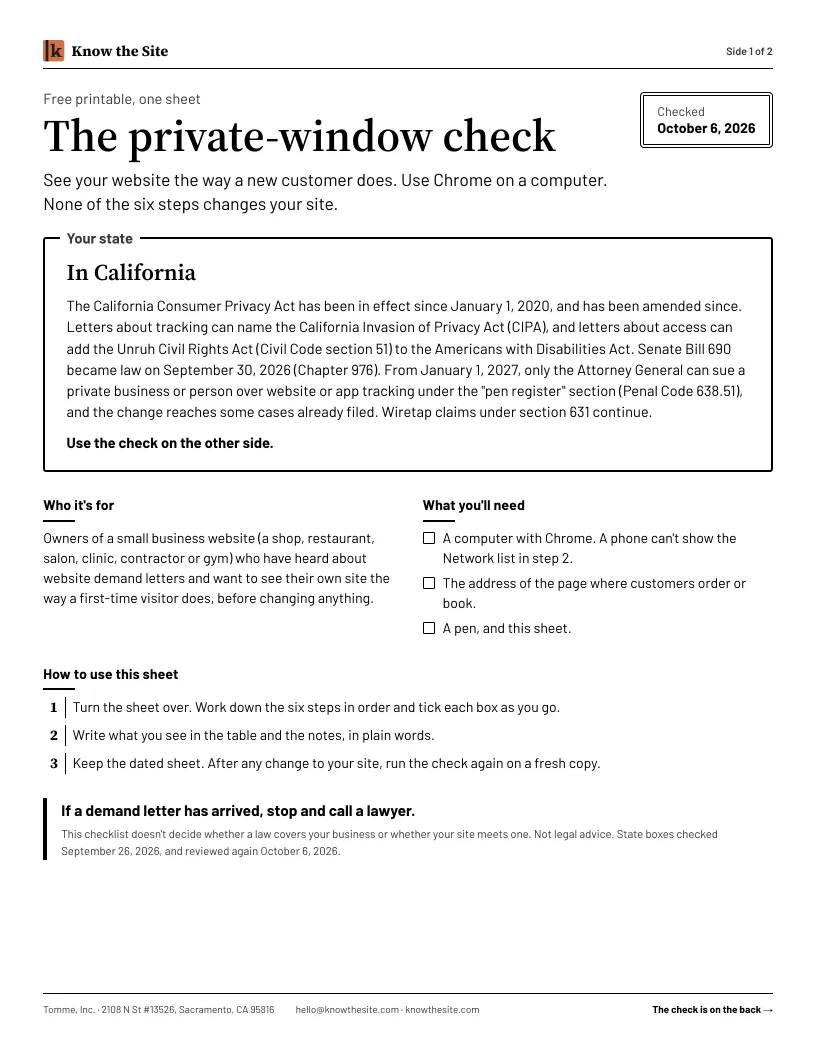
None of the steps changes your site. You don’t need to know how to code.
Why owners check before they renew
Website accessibility suits don’t only reach big brands.
By one tracker’s count (UsableNet), 64% of 2025 website-accessibility lawsuits named companies with under $25 million in revenue.
Source: UsableNet, 2025 Year-End Digital Accessibility Lawsuit Report. A vendor’s count across federal and New York and California state courts. Under $25 million still includes companies far larger than a single shop.
None of this says anything about your site. You find out by looking, not by trusting a score.
One task, no mouse, tonight
Get the page by email.
Print it, or keep it open beside your browser.
On a computer, open the page where customers order or book.
Put the mouse away. Tab, Shift-Tab, Enter. Stop before you pay, book or send.
Write down the first place you got stuck, or “got through.”
Then you can ask whoever sold you the score something specific:
“What did you check on this page beyond the scanner result?”
Opening your site this way doesn’t edit your website.
Email me the checklistWho this is for
For owners of shops, restaurants, salons, clinics, contractor businesses and gyms who haven’t received a demand letter.
It suits you if
- You’ve been sent a scan, a badge offer or a monthly fee to keep your site “handled.”
- You’d like one fact from your own site before you renew or sign.
- You want a question to put to the seller, not a verdict from them.
It’s not for you if
- A demand letter has arrived. Stop and call a lawyer.
- You want us to pick a vendor. We don’t sell one and won’t recommend one.
- You want to be told your site is fine. One visit can’t tell you that.
Get the free checklist
Free: the private-window check on one printed page, with a short box about your state. By email.
Sent. Check your email.
Look for “Your private-window checklist for your state” from Know the Site (hello@mail.knowthesite.com). It should arrive within a few minutes. Not there? Check spam or Promotions.
You asked for the follow-ups: 5 short emails over the next 9 days. Each one has a one-click unsubscribe.
We couldn’t add this address to the follow-ups, so none will come. The email says how to ask for them.
Tonight, at your computer: open a fresh Incognito window, go to the page where customers order or book, and don’t click the banner. Copy what you see, and date it.
The checklist finds what’s happening. The guides cover what to do next: where the settings live on ten kinds of site, a worked example, and how to make one change you can undo. $67 once for the California website guide, with the AI guide included. No subscription. Sales tax added where it applies. Every cent back, including sales tax, if you email hello@knowthesite.com within 30 days of the files arriving. No reason needed. See what’s in the guides
The checklist finds what’s happening. The guides cover what comes next: the full table of names to look for, where the settings live on ten kinds of site, a worked example, and how to make one change you can undo and check it again. $67 once for the California website guide, with the AI guide included. No subscription. Sales tax added where it applies. See what’s in the guides
Questions
Is the score I was sent wrong?
We can’t tell from here, and the checklist won’t say. A score is what a scanner found in the code. The keyboard check shows what one person could do on one page. Both can be true at once.
Should I remove my widget or banner app?
This page doesn’t say so, and neither does the checklist. Keep the tool. Check the claim. Step 6 asks you to write down the one finding to ask about, not to change anything.
Is it really free?
Yes. Email and state in, one printable page out. You may also receive short emails about doing the check and about our paid guides. Unsubscribe in one click.
Do I need to know code?
No. You don’t need to know how to code. The checklist shows each click.
Will this change my site?
No. Opening your site this way doesn’t edit your website. None of the six steps changes your site.
Will this tell me whether I’m compliant?
No. Nothing that looks at one visit can. It doesn’t decide which laws cover your business. Not legal advice.
What if I’ve already had a letter?
If a demand letter has arrived, stop and call a lawyer.
Do you sell a widget or a scan?
No. We sell two guides that teach you to look, for $67 once.