Law firms are sending small businesses demand letters about their websites. Here’s what the letters point at.
Free: the private-window check on one printed page.
It shows you how to look at those same kinds of things on your own website. It won’t tell you whether a letter will come. Nothing honest can.
Some letters say a disabled visitor couldn’t use the site. Others say the site sent visitors’ information to other companies without asking. Either way, the first question is the same: what does the website actually do?
Get the free checklist
Sent. Check your email.
Look for “Your private-window checklist for your state” from Know the Site (hello@mail.knowthesite.com). It should arrive within a few minutes. Not there? Check spam or Promotions.
You asked for the follow-ups: 5 short emails over the next 9 days. Each one has a one-click unsubscribe.
We couldn’t add this address to the follow-ups, so none will come. The email says how to ask for them.
Tonight, at your computer: open a fresh Incognito window, go to the page where customers order or book, and don’t click the banner. Copy what you see, and date it.
The checklist finds what’s happening. The guides cover what to do next: where the settings live on ten kinds of site, a worked example, and how to make one change you can undo. $67 once for the California website guide, with the AI guide included. No subscription. Sales tax added where it applies. Every cent back, including sales tax, if you email hello@knowthesite.com within 30 days of the files arriving. No reason needed. See what’s in the guides
- One printed page
- A short box for every state and DC
Not legal advice. It doesn’t decide which laws cover your business.
If a demand letter has arrived, stop and call a lawyer. This checklist isn’t for answering one.
Exactly what’s on the page
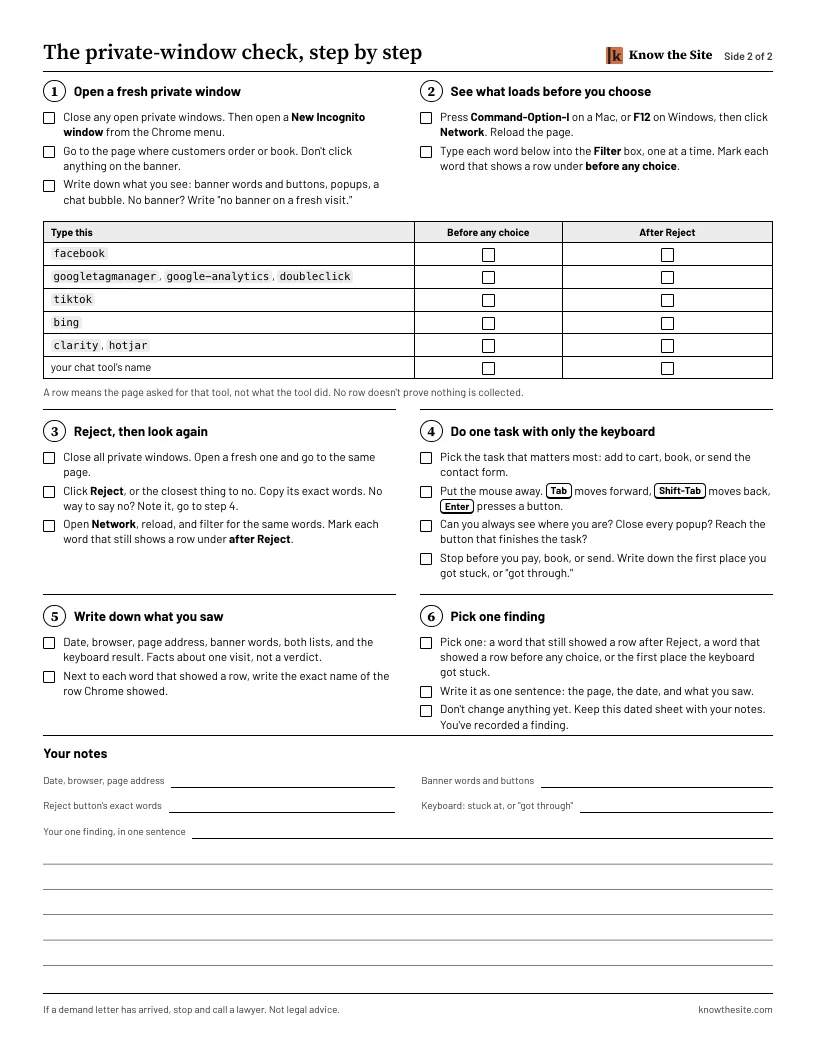
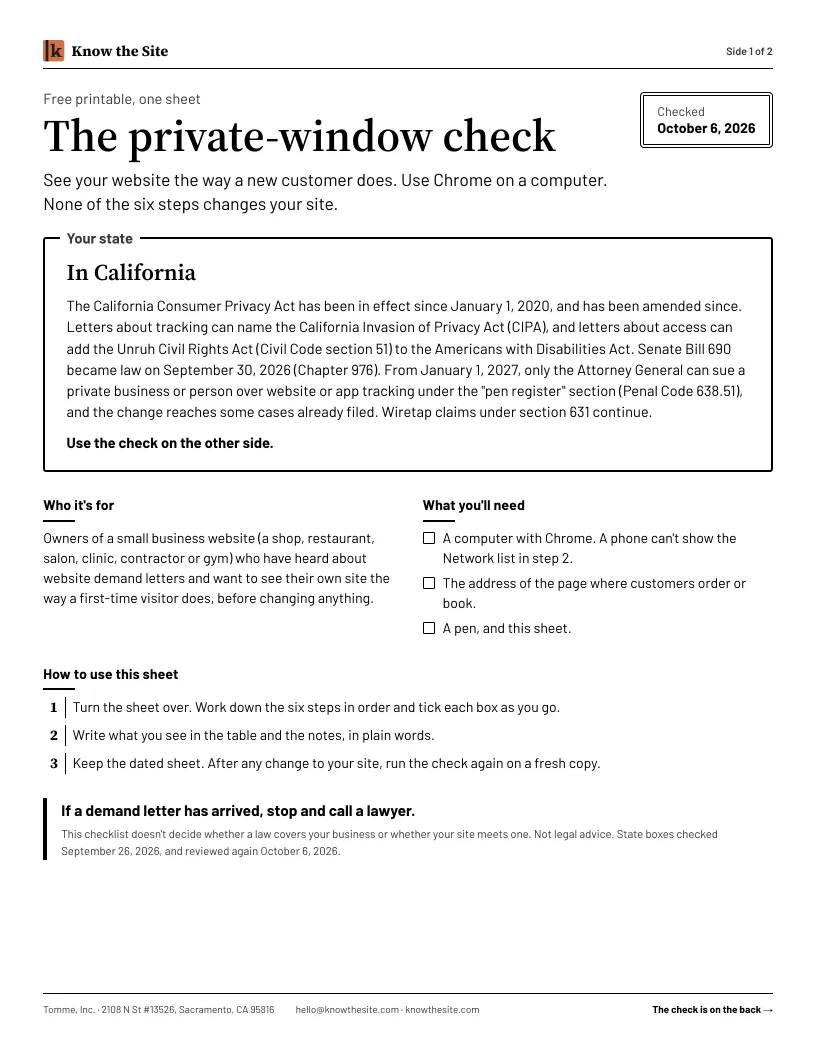
One sheet. A short box about your state on the front. Six checks on the back, with tick boxes and room to write.
Front
A short box about your state. It names the laws you may hear about where you are, with their dates. It doesn’t decide whether any of them covers your business. The checklist has a short box for every state and DC.
Back: the private-window check
Open a fresh private window
See what loads before you choose
Reject, then look again
Do one task with only the keyboard
Write down what you saw
Pick one finding
None of the steps changes your site. You don’t need to know how to code.
A row shows the page asked for that tool, not what it did. Sites can send data this list doesn’t show.
The checklist finds what’s happening. The guides cover what comes next: the full table of names to search for, where the settings live on ten kinds of site, a worked example, and a seven-day plan that ends with one change you can undo. $67 once for the California website guide, with the AI guide included. No subscription. Sales tax added where it applies. See what’s in the guides
Questions
Is it really free?
Yes. You give an email address and your state. We send the page. You may also receive short emails about doing the check and about our paid guides. Every one has an unsubscribe link.
Do I need to know code?
No. You don’t need to know how to code. The checklist shows each click, from opening the private window to typing a word into the Network list’s Filter box.
Will this change or break my site?
No. Opening your site this way doesn’t edit your website. None of the six steps changes your site. Step 6 asks you to write down the one finding to ask about, not to change anything.
Can I do it on my phone?
You can read it on your phone. The Network step needs Chrome on a computer. Send it to yourself now and do it at your desk.
Does a private window show what every customer sees?
No. Location and browser privacy settings can change what another visitor gets. The checklist asks you to record what happened on your visit, with the date.
Will this tell me if my site is legal?
No. It records what one visit did. It doesn’t decide whether a law covers your business or whether your site meets one. Not legal advice.
What if I’ve already had a letter?
If a demand letter has arrived, stop and call a lawyer. Don’t use this checklist to answer it.
Who sends this?
Know the Site, a name used by Tomme, Inc., a California corporation in Sacramento. We tried this check on a demo bakery site we built and run. If the checklist email doesn’t arrive, write to hello@knowthesite.com.